Save a ChatGPT itinerary to Google Maps
Paste the AI plan, verify the places, then export the map-ready stops.
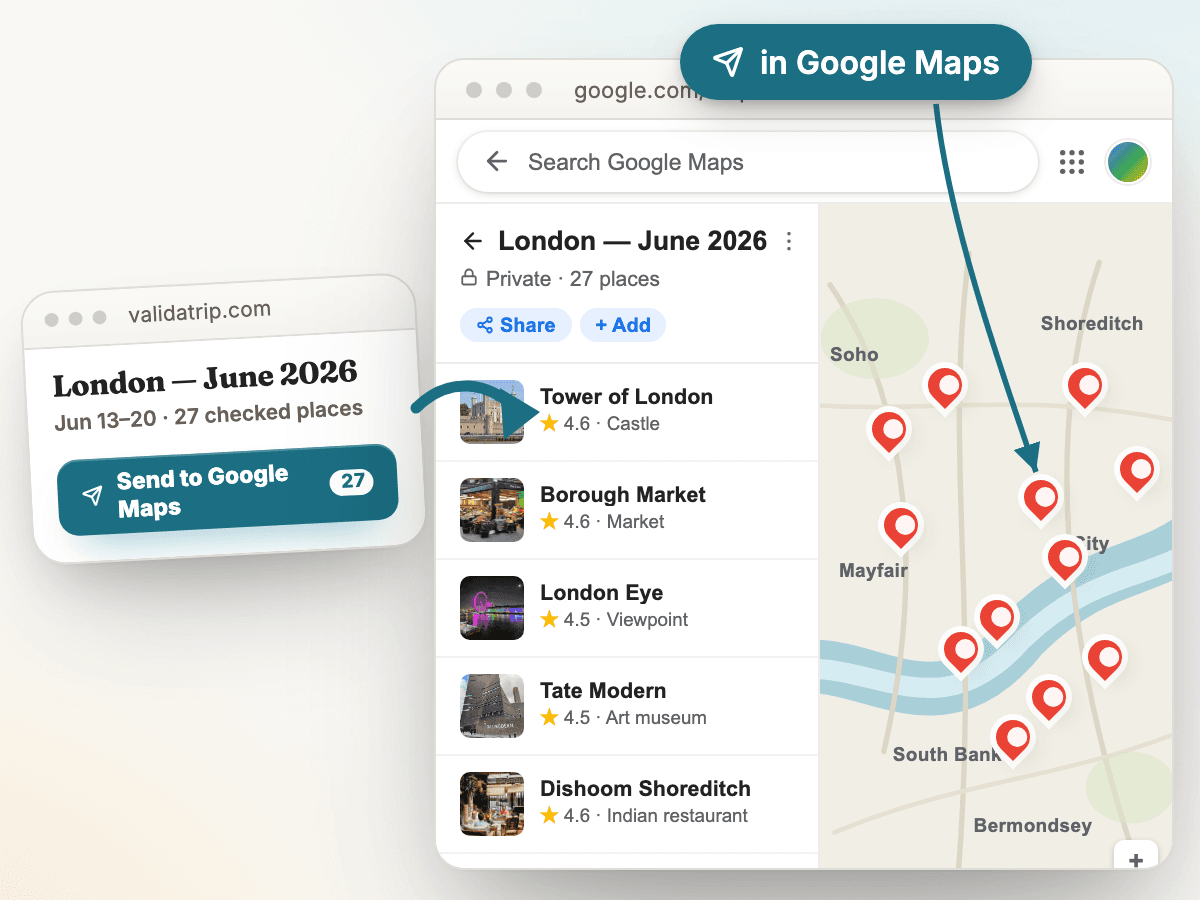
The problem
ChatGPT can write a travel itinerary quickly, but the result is usually plain text: day headings, paragraphs, and place names. Google Maps needs structured pins. Travelers end up copying each stop one at a time, then checking whether the restaurant, museum, or viewpoint still exists, is open on their dates, and belongs in the same part of town.
How Tripnostic handles it
- Paste the ChatGPT itinerary into Tripnostic as-is — day labels, bullets, and prose all work.
- Tripnostic extracts the places, checks closures, hours, booking needs, and neighborhood grouping, then keeps the verified stops in one review screen.
- Export the checked places to Google Maps once the plan is clean, instead of rebuilding the itinerary pin by pin.
Tripnostic product preview
tripnostic.com/trips
Questions
- Can I paste a ChatGPT itinerary directly?
- Yes. Paste the full answer from ChatGPT, Gemini, Claude, or another AI planner. Tripnostic reads the prose, extracts the places, and keeps the useful stops.
- Why check the itinerary before exporting to Google Maps?
- A map full of stale or closed pins still wastes trip time. Tripnostic checks hours, closures, booking needs, and neighborhoods before export so the saved map contains usable stops.
- Does this replace Google Maps?
- No. Tripnostic prepares and checks the place list; Google Maps remains the map you use for navigation and saved pins.